Connect HubSpot to the systems your business actually runs on
ERP, billing, field service, inventory, whatever it is. We build the integration properly, with field mapping that survives schema changes, conflict rules, error handling and monitoring after launch.
Trusted by founders and leaders at 185+ growing companies
 K Charles
 McIntyre Inc
 Reporting Hub
 Suntiff
 REHQ
REHQ Cadre AI
 ViB Tech
 Good2beSocial
 Get Trained AI
 Hustle20
 Collectiv Academy
 Easy Street Offers
 Gobel Group
 Digital Diabetes
 LearnBrands
 PureNSM
 Uncommon Agency
 Euka AI
 Alphaline Tiny Homes
 BetterFleet
 Garner Bio
 Sports Plus Team
 Joshua Trees Experts
 Nueways Studio
 All State Game
 Digital Momentum
 Compound Fitness
 One Base Health
 Pop Events Co
 Bayaan Academy
 Hemlane
 Farotech
 TechForGood
 Naked Pools
 Rocket SaaS
 Crown Workforce Management
 Barcliff Group
 Hermetic AI
 Performativ
 Beeontrade
 JCI InstituteK CharlesMcIntyre IncReporting HubSuntiffREHQCadre AIViB TechGood2beSocialGet Trained AIHustle20Collectiv AcademyEasy Street OffersGobel GroupDigital DiabetesLearnBrandsPureNSMUncommon AgencyEuka AIAlphaline Tiny HomesBetterFleetGarner BioSports Plus TeamJoshua Trees ExpertsNueways StudioAll State GameDigital MomentumCompound FitnessOne Base HealthPop Events CoBayaan AcademyHemlaneFarotechTechForGoodNaked PoolsRocket SaaSCrown Workforce ManagementBarcliff GroupHermetic AIPerformativBeeontradeJCI Institute
Two ways teams end up needing this
The data isn't connected
Someone re-keys orders, invoices or job data between HubSpot and another system every week.
Sales can't see whether an account has paid, so they chase people who already have.
Your ops or finance system holds the truth and the CRM holds a stale copy of it.
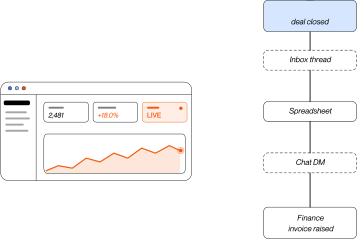
Reporting means exporting from two places and reconciling in a spreadsheet.
You already tried and it didn't hold
A Zapier or Make build works until volume, custom objects or associations break it.
The person who built it left, and nobody knows what happens when it fails.
It fails silently. Records stop syncing and nobody notices for three weeks.
Two systems disagree about the same record and there's no rule for who wins.
Connecting two systems is easy. Keeping them connected through schema changes, API limits and real volume is the actual job.
What we actually build.
We scope the integration around the objects you need synced and the direction data flows, because that's what genuinely drives complexity. Then we design the field mapping with you, build it, test it against real records, and put monitoring around it so failures surface as alerts rather than as a discovery three weeks later. Where a proven connector fits we use it. Where it doesn't, we build custom, and we'll tell you honestly which situation you're in.
Configuring the HubSpot portal itself is implementation. Moving historical data out of an old CRM is migration, which is a one-time job rather than an ongoing sync.
Not sure whether your systems can talk to each other? Fifteen minutes with an engineer will tell you.
Three scopes, driven by how much your org has accumulated.
Scoped and quoted after we've looked at your source system. Volume matters less than how messy the data is, so we'd rather see it than guess.
Get your scope and quoteThe part most quotes leave out
An integration is not a finished object. APIs change, your business rules change, and edge cases surface months in. Every build includes ongoing monitoring and maintenance after launch, covering:
Your Salesforce org has accumulated custom objects, fields, validation rules and workflows that nobody has documented in years.
The person who built most of it has left, or is about to.
Every export you've tried comes out flat. Relationships between accounts, opportunities and contacts don't survive.
Attachments, Chatter, call logs and email history are the parts everyone assumes will just be abandoned.
Your integrations are wired into Salesforce, so the CRM is only half the project.
There's an internal camp arguing you should stay, and a failed migration proves them right.
Priced monthly, cancellable, and quoted with the build so you can see the real cost of ownership rather than just the setup fee. Anyone quoting you a build with no maintenance line is quoting you half the project.
Nothing goes live until you've seen it work.
Discovery and API assessment
(WEEK 1)We check what your systems can actually expose. Some have great APIs, some have rate limits that shape the design, and a few have nothing but a scheduled export.
Mapping
(WEEK 1 TO 2)Every field, every direction, every conflict rule, in a document you sign off. This is where integrations are won or lost.
Build
(WEEK 2 TO 6)Developed against a test environment. You see progress weekly.
Test
(WEEK 6)Real records, edge cases, failure scenarios. We deliberately break it to see what happens.
Production cutover
(WEEK 6 TO 7)Go live with monitoring switched on from minute one, plus two weeks of standby.
Handover and monitoring
(ONGOING)Technical documentation delivered, then continuous monitoring and maintenance.
What this looks like when it's done
Good fit, not a fit.
Good fit
ERP or Billing System Feeding In
Your ERP, billing, or ops system holds data the CRM needs.
Manual Data Entry Every Week
Someone is manually moving data between systems every week.
Failed Integration Attempt
A previous integration attempt broke or was abandoned.
Not a fit
Single Trigger, Low Volume
One trigger, one action, contacts only, low volume, use Zapier and keep your money.
No API on the Other System
The system you want to connect has no API and no export.
Wants Permanent Two-Way Sync
You want a permanent two-way Salesforce and HubSpot sync instead of migrating.
The questions we hear most.
Start with one. Most engagements begin with a single workflow or service (an automation, a CRM cleanup, one AI agent) and expand from there as the system proves itself. You never have to buy the whole thing up front.

CONTACT US
LET'S FIGURE OUT
YOUR AI
Our Platform Partners
Every platform we build in has vetted us. None of this is self-declared.