Claude setup & optimization
You already pay for
Claude. Right now it is
an expensive chat
window.
Most teams use Claude to talk about their work. We connect it to the tools you already run, so it reads your real data and does the actual work inside them. Same seats. A fraction of the potential unlocked.
Rated Excellent on Trustpilot
Trusted by founders and leaders at 185+ growing companies
 K Charles
 McIntyre Inc
 Reporting Hub
 Suntiff
 REHQ
REHQ Cadre AI
 ViB Tech
 Good2beSocial
 Get Trained AI
 Hustle20
 Collectiv Academy
 Easy Street Offers
 Gobel Group
 Digital Diabetes
 LearnBrands
 PureNSM
 Uncommon Agency
 Euka AI
 Alphaline Tiny Homes
 BetterFleet
 Garner Bio
 Sports Plus Team
 Joshua Trees Experts
 Nueways Studio
 All State Game
 Digital Momentum
 Compound Fitness
 One Base Health
 Pop Events Co
 Bayaan Academy
 Hemlane
 Farotech
 TechForGood
 Naked Pools
 Rocket SaaS
 Crown Workforce Management
 Barcliff Group
 Hermetic AI
 Performativ
 Beeontrade
 JCI InstituteK CharlesMcIntyre IncReporting HubSuntiffREHQCadre AIViB TechGood2beSocialGet Trained AIHustle20Collectiv AcademyEasy Street OffersGobel GroupDigital DiabetesLearnBrandsPureNSMUncommon AgencyEuka AIAlphaline Tiny HomesBetterFleetGarner BioSports Plus TeamJoshua Trees ExpertsNueways StudioAll State GameDigital MomentumCompound FitnessOne Base HealthPop Events CoBayaan AcademyHemlaneFarotechTechForGoodNaked PoolsRocket SaaSCrown Workforce ManagementBarcliff GroupHermetic AIPerformativBeeontradeJCI Institute
The gap
A genius with no hands and no memory of your business.
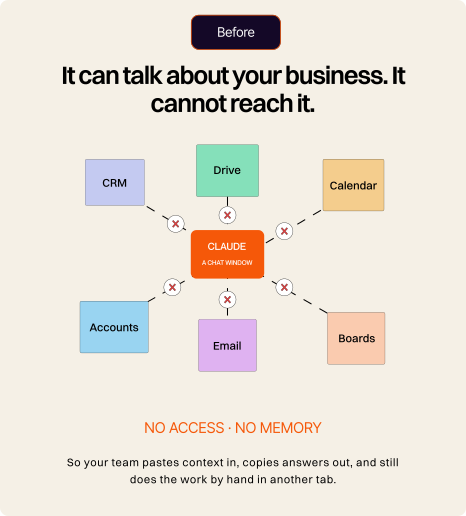
Out of the box, Claude is brilliant and completely cut off. It cannot see your pipeline. It does not know last quarter's numbers. It cannot open the document, update the record, or send the thing. So people paste in context, copy out answers, and do the actual work by hand. That is not Claude failing. That is Claude unplugged.
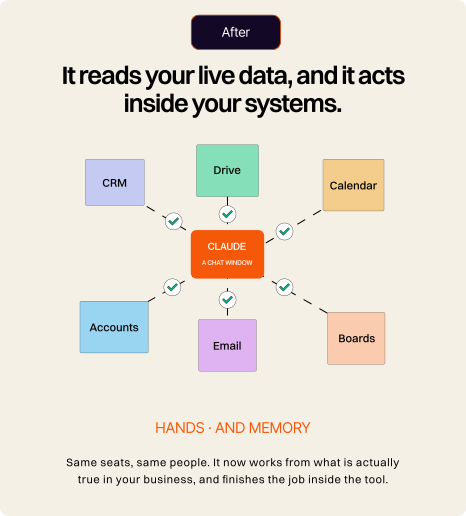
Give it two things and everything changes. Hands, meaning a secure connection to the tools you already use so it can read live data and act inside them.
And memory, meaning your playbooks, templates and way of doing things, loaded in once and reused by the whole team.
MIT's study of enterprise AI found that only around 5% of pilots captured real value, and the vast majority showed no measurable impact on the bottom line. The cause was not the model. It was the failure to connect AI to real data and real workflows. The gap between the companies getting value and the ones that are not is integration, not the tool.
MIT Project NANDA, The GenAI Divide, 2025 · preliminary study
Sound familiar?
This is for you if, this week, somebody on your team...
Pasted the same company background into Claude for the fifth time, because it never remembers.
Asked it a question it could not answer, because the answer lives in your CRM rather than the chat.
Copied its output into a document by hand, then reformatted it to match your house style
Used it to draft something, then went and updated the actual record in another tab anyway
Has a paid seat they have barely opened since the first week.
Built something genuinely clever in Claude that nobody else on the team can find or reuse.
If you recognise three or more of those, you are using roughly a tenth of what you already pay for. That is the part we fix.
That sounds like usBefore / after
The difference is not a better prompt. It is being plugged in.
The connections
We plug Claude into the tools you already run.
Claude reaches business software through an open standard called MCP. Think of it as a universal adapter that lets it both read data from a tool and take actions inside it. Many of the tools you use ship an official connector. For the ones that do not, including older and in-house systems, we build one.
CRM & sales
Work, docs & comms
Finance, data & commerce
Not every tool connects the same way. Some are one click and official. A few, and Salesforce is the notable one, have no one-click connector yet, so we go through their own secure server or an automation layer instead. Some connectors only read; others read and act. Knowing the difference for your exact stack, and setting each one up with the right permissions, is a real part of the job. The list also changes almost weekly, so we verify what is live for your tools at the start of every engagement.
The build
Five things that turn a chat window into a coworker.
Connections
Plug it into your business. Claude works from your live data and can take action, updating a record, creating the task, drafting the email, instead of only talking about it.
MCP connectors · official + custom · read and write, scoped
Skills
Teach it your way of working. We package your playbooks, templates, house style and review checklists so it does your recurring work the way your best person would, without being briefed again.
Claude Skills · instructions, scripts and resources · triggered automatically
Shared context
Get the knowledge out of one person's chat history. Shared workspaces so the whole team pulls from the same company context, rather than fifteen private chats that each know something slightly different.
Claude Projects · shared knowledge and instructions · team level
Background automations
Work that happens without anyone opening Claude. Scheduled, hands-off jobs like the Monday briefing, the weekly rollup or the recurring prep, landing finished and on time.
MCP connectors · official + custom · read and write, scoped
Enablement
Make the team actually use it, and prove it saved time. Training, a shared prompt library and a simple before and after so you can see the hours back. Adoption is where most AI spend quietly dies.
Working sessions · prompt library · time-saved baseline
Custom connectors
For the systems with no connector at all. The old database, the in-house tool, the platform nobody has integrated with since 2014. If it has a way in, we can build Claude a door.
Custom MCP server · scoped credentials · logged and permissioned
What it looks like
Two ordinary jobs, done end to end.
Example one · revenue operations
"Get my pipeline ready for Monday's forecast call."
Every open deal in the CRM, with owner, stage, value and last activity.
Recent email and calendar activity, to see which deals have actually gone quiet.
A one-page forecast summary in your format, ready for the call.
On your approval, a follow-up task and a note on each stale deal, so the CRM ends up clean too.
One prompt. Two systems read, one updated. A morning of pipeline hygiene that usually never gets done.
Example two · client onboarding
"Set up the client we just signed."
The signed proposal in your drive and the deal record it came from.
The project and full task template in your project tool, dated from the start date in the proposal.
The onboarding document in your house style, filed in the right client folder.
A kickoff email drafted and waiting in the inbox for someone to read and send.
Twelve manual steps become one, with a person approving the output before anything leaves the building.
Every action that changes something waits for a human to approve it. Claude proposes, you confirm. Nothing irreversible happens on its own, and nothing gets sent without someone reading it first.
For your IT and security team
Connected, not wide open.
Connecting an AI to your systems is exactly where a proper setup earns its money. Here is how we handle it, and it is the conversation we would rather have early than late.
Your data is not training the model.
On Claude's paid business plans, Anthropic states it does not use your inputs or outputs to train its models by default. We confirm the right plan and settings for your risk profile.
Least privilege by default.
Every connection is scoped to the minimum it needs. Read-only where reading is enough, write access only where the work requires it.
Humans approve actions.
Anything that changes a record, sends a message or touches the outside world waits for a person.
We plan for prompt injection.
A connected AI can be tricked by malicious instructions hidden in the data it reads. That is a documented, real risk. We limit scopes, control which sources it trusts, and keep the blast radius small.
Admin controls on the right plan.
Single sign-on comes on Team. Automated provisioning, audit logs and custom retention sit on Enterprise. We tell you honestly when a requirement genuinely needs the bigger plan.
The process
From expensive chat window to does the work.
01
Discovery
We sit with your team, find the recurring work worth automating, and check which of your tools have connectors and which need building. You get a shortlist ranked by hours saved.
02
Connect the stack
We wire Claude into your approved tools with scoped permissions, and build custom connectors for anything that does not have one.
03
Build Skills and shared context
Your playbooks, templates and house style packaged so Claude works your way, and shared workspaces so the whole team runs off the same context.
04
Set up the background work
The scheduled and hands-off jobs, briefings, rollups and recurring prep, set to run without anyone sitting in a chat.
05
Train and roll out
Working sessions, a shared prompt library and adoption support, so your team genuinely changes how it works rather than nodding politely.
06
Measure and tune
A simple before and after on the workflows we touched. Adoption and hours saved are the scoreboard, agreed with you up front.
A focused first engagement is usually weeks rather than months. Custom connectors and bigger stacks add time. We scope first, then quote, because no two stacks are the same and a fixed package would only be honest for one of them.
FAQ
The questions we hear most.

CONTACT US
LET'S FIGURE OUT
YOUR AI
Our Platform Partners
Every platform we build in has vetted us. None of this is self-declared.